 Scanbrix

Go Back
Best Tools for Small to Medium Commercial As-Built Surveys — Ranked (2026)
That gap has created real demand for a better option. This post ranks the best tools for small commercial as-built surveys, defined here as spaces between 1500 and 10,000 square feet. The evaluation criteria are output format, accuracy, time on site, and how the cost and quality of the output holds up as project frequency increases.

Best Tools for Small to Medium Commercial As-Built Surveys — Ranked (2026)
Enterprise-grade laser scanning was built for complex, large-scale projects with budgets and timelines to match. For the significant portion of commercial work that sits below that threshold, retail units, restaurant fit-outs, office suites, tenant improvements, multi-unit residential blocks, it is overkill in cost, setup time, and operational overhead.
That gap has created real demand for a better option. This post ranks the best tools for small commercial as-built surveys, defined here as spaces between 1500 and 10,000 square feet. The evaluation criteria are output format, accuracy, time on site, and how the cost and quality of the output holds up as project frequency increases.
What counts as a small commercial as-built survey?
To be specific about the use case this post is addressing:
Spaces between 1500 and 10,000 square feet
Project types: tenant improvements, retail fit-outs, office renovations, restaurant redesigns, property management documentation, stairwell surveys, multi-unit programmes
Who commissions them: architects pre-design, contractors pre-bid, facilities managers for record-keeping, commercial interior designers, property management groups across portfolios
There are two meaningfully different buyers in this category. The first is a firm running one or two surveys per quarter, an architect who occasionally needs an as-built before a renovation project. The second is a firm for whom as-built documentation is a recurring operational requirement, a kitchen design company that measures every new project, a retail rollout team documenting multiple locations, a housing association capturing existing conditions across a stock of properties.
The right tool is the same for both. What changes is how clearly the value of getting it right shows up on the bottom line.
What makes a good small commercial as-built tool?
Four criteria matter for this use case:
Output format — does the output go directly into Revit, AutoCAD, or SketchUp, or does it require manual redrafting before it is usable? A PDF of a floor plan is documentation. A CAD file is a working document.
Accuracy — what level of precision does the project require? Space planning and early-stage design have a different tolerance than construction documentation. The tool needs to meet the standard the output will be held to.
Time on site — how long does capture take? For small spaces, extended setup time is not justified by the project scope. Faster capture means more surveys per day and lower cost per project.
Total cost per survey — including hardware, software, and any downstream drafting time. A tool that appears cheaper at the point of purchase can be more expensive in practice once you account for the work required after the scan.
The best tools for small commercial as-built surveys — ranked
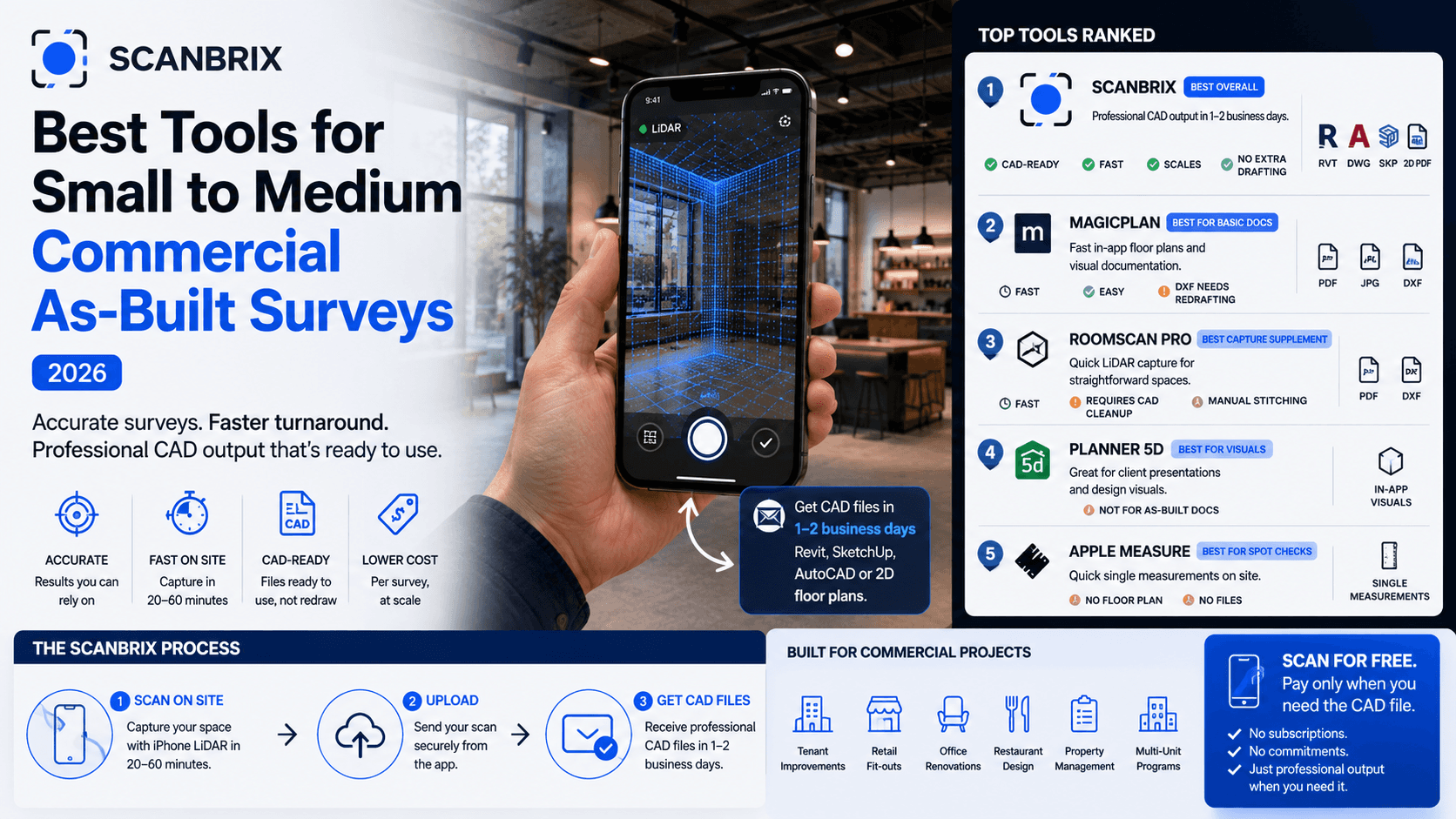
1. Scanbrix — best for professional output across any project size
Scanbrix captures a space using iPhone LiDAR and delivers a professional CAD file — Revit, SketchUp, AutoCAD, or a 2D floor plan — within one to two business days. No additional hardware beyond an iPhone 12 Pro or later. No specialist operator. No point cloud processing. The file arrives ready to use.
Time on site: Approximately 20–60 minutes per survey depending on space size and complexity
Output: CAD files delivered in 1–2 business days depending on project size — Revit, SketchUp, AutoCAD, 2D floor plans
Hardware required: iPhone 12 Pro or later (LiDAR sensor)
Pricing: Free to scan; pay per CAD delivery
The value of a consistent professional output is straightforward for a single survey: the drawing is ready to use on arrival and the project moves forward. Where that value compounds is at scale.
A kitchen design company running eighty installations a month needs an accurate as-built drawing before design work can begin on every single one. With a traditional survey workflow, that is eighty separate measurement visits, eighty sets of hand sketches, and eighty rounds of CAD drafting. With Scanbrix, there are eighty iPhone scans, each producing the same quality of output, at a fraction of the per-survey cost. The workflow is consistent, the output is consistent, and no additional headcount is required to scale it.
The same logic applies to a retail rollout team documenting locations across a franchise, a property management group maintaining records across a portfolio, or an architecture firm running a tenant improvement programme for a commercial client.
Honest limitation: Requires iPhone with LiDAR sensor — iPhone 12 Pro and above. Earlier iPhone models are not compatible.
2. Magicplan — best for basic on-site documentation
Magicplan uses iPhone LiDAR to produce floor plans quickly within the app. It is fast to learn and produces a visual output within minutes of starting a scan.
Best for: Property managers or facilities teams who need basic visual records — not construction documentation
Output formats: PDF, JPG, DXF (basic)
The DXF output requires significant redrafting before it is suitable for any professional downstream use. For small commercial as-built work where the drawing feeds a contractor brief, a permit application, or an architect's design model, Magicplan's output is the start of a process rather than the end of one. That additional step has a cost, in time, in error risk, and in the delay it introduces to the project.
3. RoomScan Pro — best as a capture supplement
RoomScan Pro captures room geometry using iPhone LiDAR. It is quick to use for straightforward spaces and produces a basic floor plan.
Best for: Firms with an existing CAD drafting workflow who want to speed up the capture step
Output formats: PDF, DXF
Like Magicplan, the output requires professional drafting work to be usable for commercial documentation. Multi-room commercial spaces require manual stitching of individual room scans. For teams who already have a drafter and want a faster way to get raw geometry to them, it can accelerate part of the process. It does not remove the downstream work.
4. Traditional laser scanner — when the project scope justifies it
Traditional laser scanners, FARO, Leica, and similar systems, are accurate to within two millimetres and produce point cloud data that integrates with Revit via software like Autodesk ReCap. They are the industry standard for complex or large-scale projects.
Best for: Spaces over 10,000 sq ft that have significant budget resources, projects with complex geometry, or structural engineering work requiring millimetre precision
For small commercial work, the economics rarely work. Equipment costs run into the tens of thousands of dollars to purchase. Day rates for a specialist operator are significant. Setup time per space adds hours to each survey. For a 2,000 square foot retail unit, the cost of a traditional laser scan survey often exceeds what the project budget allows, and the precision it delivers exceeds what the project actually requires.
This is not a criticism of the technology. For the work it was designed to do, it remains the right tool. For small commercial as-built surveys, it is sized for a different problem.
5. Manual measurement — the baseline most firms start from
Tape measure or handheld laser measure, hand sketch on site, CAD drafter produces the final drawing. This is where most firms begin, and many continue, because it requires no new software, no new hardware, and no training.
Typical cost: [X–X per survey depending on space size and drafter rates]
Time: Site visit [X hours] + drafting [X hours] + review cycle
The friction of manual measurement is not in any single step, it is in the compounding of small inefficiencies across every project. A measurement missed on site means a return visit. A dimension transcribed incorrectly means a revision to the drawing. A hand sketch that was clear on site is ambiguous two days later when the drafter is working from it. Each of these is a manageable problem on a single project. Across ten or twenty surveys a month, they accumulate into a significant operational overhead.
Understanding where that overhead sits in your current process is the starting point for understanding what a better workflow is worth.
How the value of getting this right scales with your workload
The case for a better as-built workflow is not only about project frequency — it is about what is at stake on each project.
The as-built drawing is not the end product. It feeds the design, the bid, the permit application, the contractor brief. An inaccurate or delayed drawing creates friction at every one of those downstream stages. A clean, professional CAD file delivered the next morning removes that friction entirely.
That relationship between drawing quality and downstream project efficiency gets stronger the more complex and frequent the work:
A single retail unit renovation: one accurate drawing saves one round of back-and-forth with the contractor. The time saved is real. The cost avoided — one revision cycle, one return visit — is measurable.
A ten-unit fit-out programme: the same drawing quality, repeated across every unit. Consistency means the contractor moves from one space to the next without re-measuring or querying dimensions. The per-unit time saving accumulates into days across the programme.
An ongoing portfolio of twenty or more surveys per month: at this scale, the as-built workflow is a core operational process. Every inefficiency in it repeats across every project, every month. A firm running a kitchen design programme, a retail rollout, or a property management operation at this volume does not just want a faster tool — they need a reliable pipeline that produces the same output, every time, without requiring additional staff or oversight to maintain quality.
The point is not that Scanbrix only makes sense above a certain project count. It is that the larger and more frequent the work, the more expensive a slow or inconsistent as-built workflow becomes — and the more clearly that cost disappears when you replace it.
What does a small commercial as-built survey actually cost?
Method | Time on site | Drafting time | Typical total cost |
|---|---|---|---|
Traditional laser scan | 4–8 hours | 10+ days | $2,500–$5,000+ |
Manual measurement | 2–4 hours | 10+ days | $3000+ |
Scanbrix | 20–60 minutes | 2 - 5 days | $.20 per sq ft |
Our recommendation
For any firm running commercial as-built surveys where the output needs to be professionally usable, feeding a contractor brief, an architect's design model, or a permit application, Scanbrix is the clearest path to consistent, professional output without the overhead of traditional methods.
The scan happens on site with an iPhone. The CAD file arrives in your inbox ready to be used. The project moves forward.
See how Scanbrix works for commercial teams. Scanning is always free.
Frequently asked questions
Are there mobile apps for capturing small commercial as-built measurements?
Yes. iPhone LiDAR, available on iPhone 12 Pro and later, is accurate enough for most small commercial as-built documentation work. Scanbrix uses iPhone LiDAR to capture a space and delivers a professional CAD file within one to two business days. Other apps including Magicplan and RoomScan Pro also use iPhone LiDAR but produce outputs that require additional professional drafting before they are usable for construction or design documentation.
How long does it typically take to complete small commercial as-built drawings?
With a traditional survey workflow, manual measurement on site followed by CAD drafting, a 2,000 square foot commercial space typically takes two to four hours on site and four to eight hours of drafting, with a delivery timeline of several days. With Scanbrix, the same space can be captured in twenty minutes and the CAD file is delivered within one to two business days.
What equipment is used by professionals for small commercial as-built measurements?
Traditionally: tape measures, handheld laser measures (such as Leica Disto), and occasionally tripod-mounted laser scanners for complex projects. An increasing number of professionals are using iPhone LiDAR scanning, specifically apps like Scanbrix, for small commercial work, because the capture speed, output quality, and cost per survey compare favourably with both manual measurement and enterprise scanning for spaces under 10,000 square feet.