 Scanbrix

Go Back
Best Matterport Alternatives for Small Projects (2026)
If your job is getting a CAD file to a contractor by tomorrow morning, or running the same type of survey across dozens of projects a month, it is the wrong tool. Not because it is a bad product, but because that is not what it was designed to do.

Best Matterport Alternatives for Small Projects (2026)
Matterport was built for a specific job: large-scale real estate documentation, enterprise facility management, and immersive 3D tours. If that is your job, it does it well.
If your job is getting a CAD file to a contractor by tomorrow morning, or running the same type of survey across dozens of projects a month, it is the wrong tool. Not because it is a bad product, but because that is not what it was designed to do.
Two gaps show up consistently for professionals doing small commercial and residential project work:
The output gap. Matterport produces a 3D tour and a point cloud. Getting from that to a Revit model or an AutoCAD drawing requires additional software, additional processing time, and usually additional expertise. For professionals who need a CAD file, Matterport is the beginning of a workflow, not the end of one.
The speed gap. For small commercial spaces, a retail unit, a restaurant fit-out, an office suite, a stairwell, the setup, processing, and management overhead of a Matterport workflow adds time that the project scope does not justify.
This post covers the best alternatives for professionals who have run into one or both of those gaps, with specific focus on CAD output quality and the ability to run a consistent, scalable survey workflow.
What to look for in a Matterport alternative
For the small project and volume use case, three criteria matter:
CAD-ready output — does it deliver Revit, SketchUp, AutoCAD, or 2D floor plans without an intermediate processing step? The value of professional documentation is in the file being immediately usable by whoever receives it.
Speed per survey — how long does capture take from walking through the door to leaving the site? For small commercial spaces, the ratio of setup time to actual survey time needs to make sense for the project budget.
Scalability — does the workflow hold up when you run it repeatedly? A tool that works for one survey per quarter looks different from a tool that works for twenty surveys per month. Consistency of output, ease of repeat use, and cost per delivery all factor in at volume.
The best Matterport alternatives for small projects — ranked
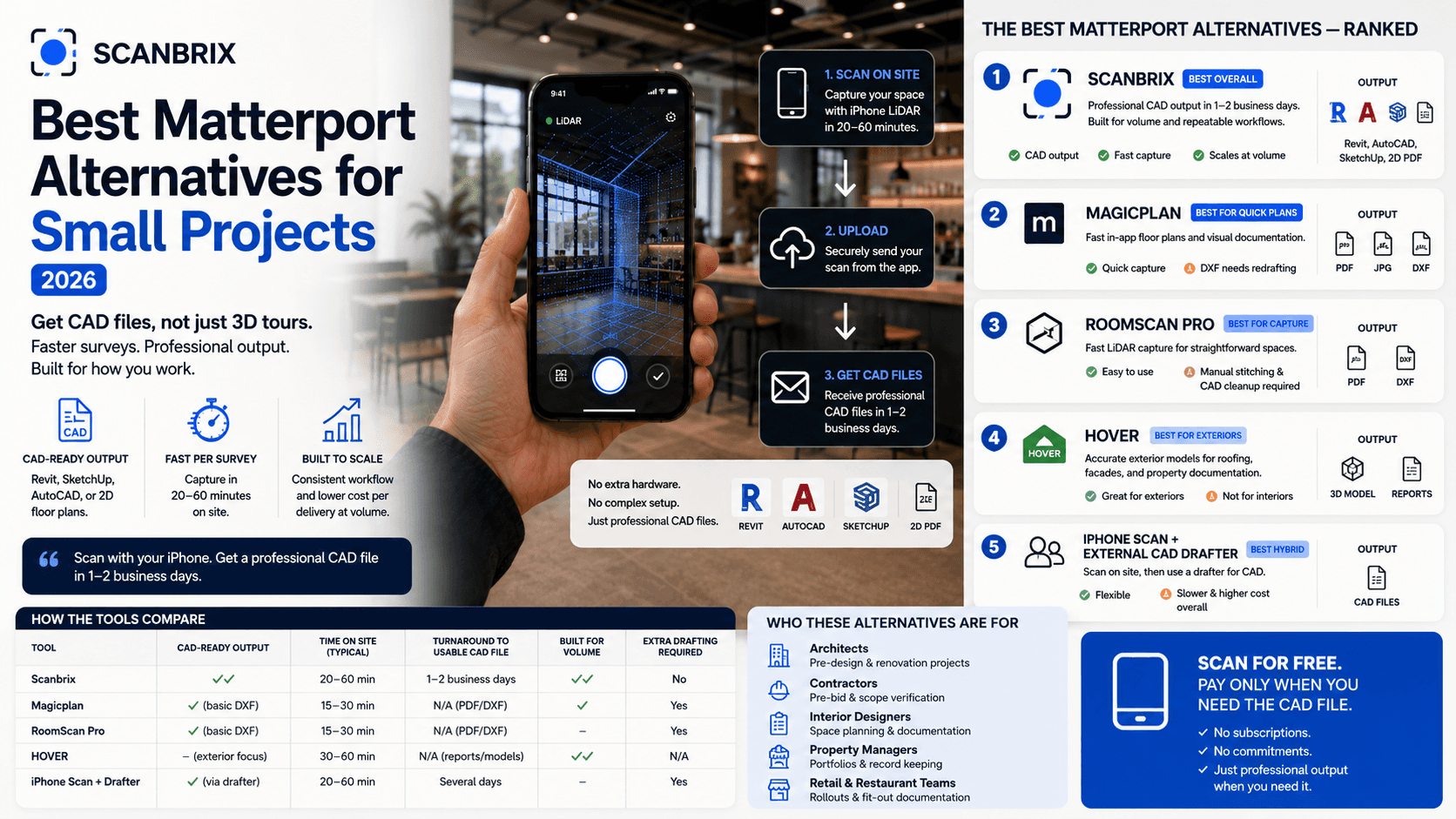
1. Scanbrix — best for CAD output and volume workflows
Scanbrix uses iPhone LiDAR to capture a space, then delivers a professional CAD file — Revit, SketchUp, AutoCAD, or a 2D floor plan — within one to two business days. The capture happens with a standard iPhone. The output is a finished working document.
This directly addresses the two gaps that bring most people to this search. The output is a CAD file, not a point cloud that needs further processing. The capture workflow is an iPhone walkthrough, no additional hardware, no specialist operator, no setup time beyond arriving at the space.
Output formats: Revit, SketchUp, AutoCAD,
Turnaround: 1–2 business days from scan to delivery
Hardware: iPhone 12 Pro or later
Pricing: Free to scan; pay per CAD delivery
Where Scanbrix becomes particularly strong is at volume. A kitchen design firm running eighty installs a month needs an accurate as-built before design can begin on every job. A retail rollout team documenting locations across a franchise needs consistent drawings at each site. A property management group needs the same quality of record across a portfolio. At that frequency, the workflow has to be repeatable without adding operational complexity.
An iPhone walkthrough that produces a professional CAD file the next morning is that workflow. No additional hardware to manage, no specialist operator to schedule, no point cloud to process. The output is the same on the eightieth survey as it was on the first.
Honest note: If you need an immersive 3D tour for a real estate listing or large-scale facility management, Scanbrix is not the right tool. It is built for professionals who need CAD documentation, not tour content.
2. Magicplan — best for quick floor plan documentation
Magicplan uses iPhone LiDAR to produce in-app floor plans quickly. For straightforward spaces where a visual record is the end goal, it is fast and accessible.
The output gap for professional use is the same as with Matterport, just different in nature. Magicplan produces PDFs and basic DXF files. The DXF requires significant redrafting before it is usable for any formal documentation — contractor briefs, architect drawings, permit applications. If the floor plan is the final deliverable and it stays as a PDF, Magicplan gets there quickly. If the floor plan feeds a downstream professional process, it is the start of additional work.
3. RoomScan Pro — best for fast LiDAR capture
RoomScan Pro captures room geometry using iPhone LiDAR and produces a basic floor plan. For straightforward single-room spaces it is fast to use.
Multi-room commercial spaces require manual stitching of individual scans. Like Magicplan, the output needs professional drafting work to be usable for construction or design documentation. For teams who want a faster capture step in an existing manual drafting workflow, it can accelerate part of the process. It does not remove the drafting step.
4. HOVER — best for exterior project documentation
HOVER uses smartphone photos to build accurate 3D models of building exteriors. For roofing, siding, facade documentation, and exterior renovation estimates, it is a strong tool with specific insurance and construction industry integrations.
It is worth mentioning because some professionals doing mixed interior/exterior project work will encounter it. For interior as-built documentation, it is a different category entirely and is not a direct comparison to Matterport or Scanbrix.
5. iPhone scan + external CAD drafter — the hybrid approach
Some firms use an iPhone scanning app to capture geometry on site, then pass the output to an external CAD drafter to produce the final drawing. This is a legitimate approach and works for teams who already have a drafting relationship in place.
The friction is in the handoff. Two vendors, a file transfer, a briefing process, and a review cycle. Each survey introduces a coordination step that does not exist when the capture and the drafting are a single service. For occasional surveys where the relationship is established, the hybrid approach is manageable. At volume, the coordination overhead accumulates.
Side-by-side comparison
Matterport | Scanbrix | Magicplan | RoomScan Pro | HOVER | |
|---|---|---|---|---|---|
Hardware needed | Matterport camera | iPhone 12 Pro+ | iPhone | iPhone | Any smartphone |
Primary output | 3D tour + point cloud | CAD files (Revit, SketchUp, AutoCAD) | PDF / basic DXF | PDF / basic DXF | 3D exterior model |
CAD-ready output? | No — extra steps required | Yes | No — needs redrafting | No — needs redrafting | No — exterior only |
Turnaround | Tour: immediate. CAD: manual | 1–2 business days | Immediate | Immediate | Hours |
Volume workflow | Not designed for it | Built for it | Possible at low volume | Not ideal | Yes — exterior |
The volume question — if you are running ten or more surveys a month
The economics of as-built documentation change when surveys move from occasional to recurring. A one-off survey can absorb a complicated workflow. Ten surveys a month cannot.
The buyers for whom this matters most:
Kitchen and bathroom design firms — every job requires an accurate as-built before design begins. A firm running forty or eighty installations a month has forty or eighty surveys to run. The per-survey cost and the consistency of the output are operational variables, not just productivity preferences.
Retail rollout teams — documenting multiple locations for a brand refresh, franchise fit-out, or compliance update. Each location needs the same quality of drawing. The workflow has to be repeatable without a specialist on site at every location.
Commercial property management — ongoing documentation of units across a portfolio. Records need to be accurate, consistent, and available on demand. Building a reliable pipeline for that is a one-time operational decision that pays back across every future survey.
Architecture firms with repeat commercial clients — tenant improvement programmes, multi-site clients, renovation schemes. The as-built drawing is the first deliverable on every project. Getting it right quickly and consistently is the baseline for everything that follows.
For these buyers, the question is not which app works for a single survey. It is which workflow works at the scale and frequency that the business actually runs at.
Our recommendation
For professionals who need CAD output Scanbrix is the clearest answer on this list. The output is the file you need, delivered to your inbox, from an iPhone capture that takes under an hour for most small commercial spaces.
The value of that is straightforward on a single project. At volume, it becomes a meaningful operational advantage.
See a sample Scanbrix output — what a delivered CAD file actually looks like.
Frequently asked questions
Why does Matterport not export directly to Revit or AutoCAD?
Matterport was designed around 3D tour content and point cloud data rather than CAD file production. Getting from a Matterport scan to a Revit model involves exporting a point cloud, importing it into software such as Autodesk ReCap, cleaning the data, and then modelling from it. That process is workable for large-scale projects where the complexity justifies it. For small commercial work where the goal is a clean drawing the next day, it adds significant time and expertise requirements that the project usually cannot absorb.
What is the best Matterport alternative for architects?
For architects who need CAD output — as-built drawings that feed into design models, contractor briefs, or permit applications — Scanbrix is the most direct alternative. It produces Revit, SketchUp, and AutoCAD files from an iPhone LiDAR scan within one to two business days, with no additional hardware or specialist operator required.
Can I get professional floor plans from an iPhone instead of Matterport?
Yes. iPhone LiDAR (available on iPhone 12 Pro and later) is accurate enough for professional interior documentation work. Scanbrix uses that LiDAR data to produce professional CAD files delivered within one to two business days. The capture happens with your existing iPhone.